Timesheet review
- Confirm the employee and pay-period dates.
- Enter actual start and end times and unpaid breaks.
- Mark shifts that end the following day.
- Review missing or invalid inputs before approving hours.
FREE RESOURCES / TIME & ATTENDANCE
One simple place for hours worked. Choose a weekly or two-week sheet, enter each shift and keep an approval record alongside the totals.
 Excel
Excel PDFFree download
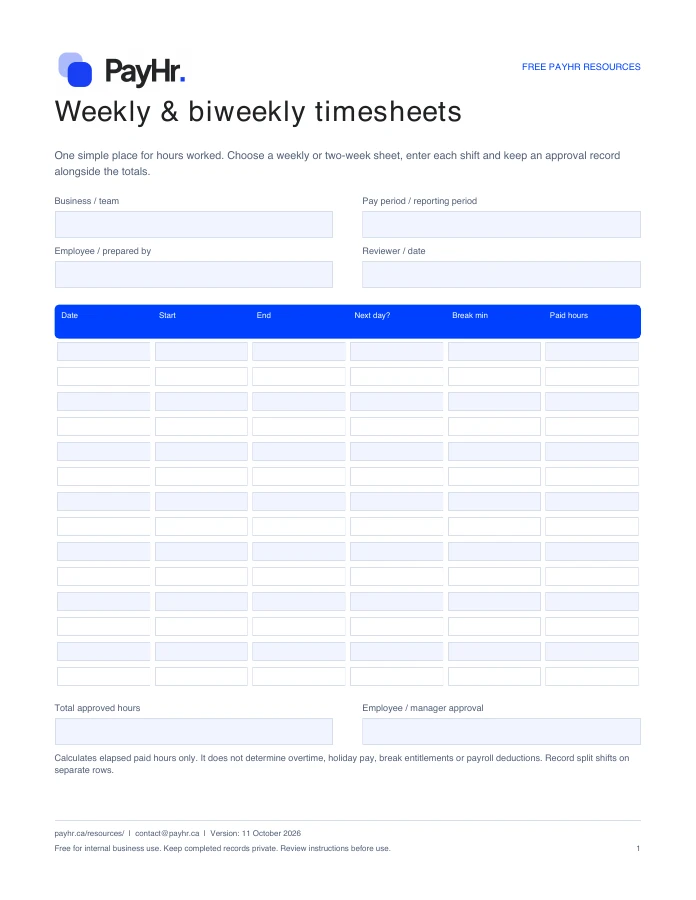 Preview of the actual PDF
READY FOR YOUR NEXT PAYDAY
Download a fresh copy, add your details and adapt it to the way your team works.
No account or email required. Free for internal business use.
FROM DOWNLOAD TO DONE
WHAT YOU CAN PREPARE
Set Ends next day to Yes. The worksheet adds one day before subtracting the start time and unpaid break. A single row is intended for a shift of up to 24 hours.
No. The total is a time record. Apply the applicable employment rules and your approved payroll settings separately.
No. Every resource is available to download directly. Email updates are optional and separate from your download.
No. These are files you download and complete yourself. PayHr does not receive the contents of your completed template. Keep employee and payroll records in your own secure storage.
OPTIONAL EMAIL UPDATES
Get PayHr product updates, new tools and practical payroll guides. Your tools and downloads are free without subscribing.

 ExcelPDF
See the week before it starts. Plan shifts, note coverage gaps and share a clear schedule with your team.
View resource ExcelPDF
Bring attendance notes into one consistent log. Compare planned and worked hours and record follow-up without turning the sheet into a medical record.
View resource PDF
PDFA repeatable check before every payday. Keep approved hours, employee changes, payment instructions and your final review in one place.
View resourceYOUR NEXT PAYDAY, TOGETHER
Explore free payroll software for Canadian businesses, with unlimited employees, contractors and pay runs.
Create your free workspace See plan details