FREE RESOURCES / PAYROLL

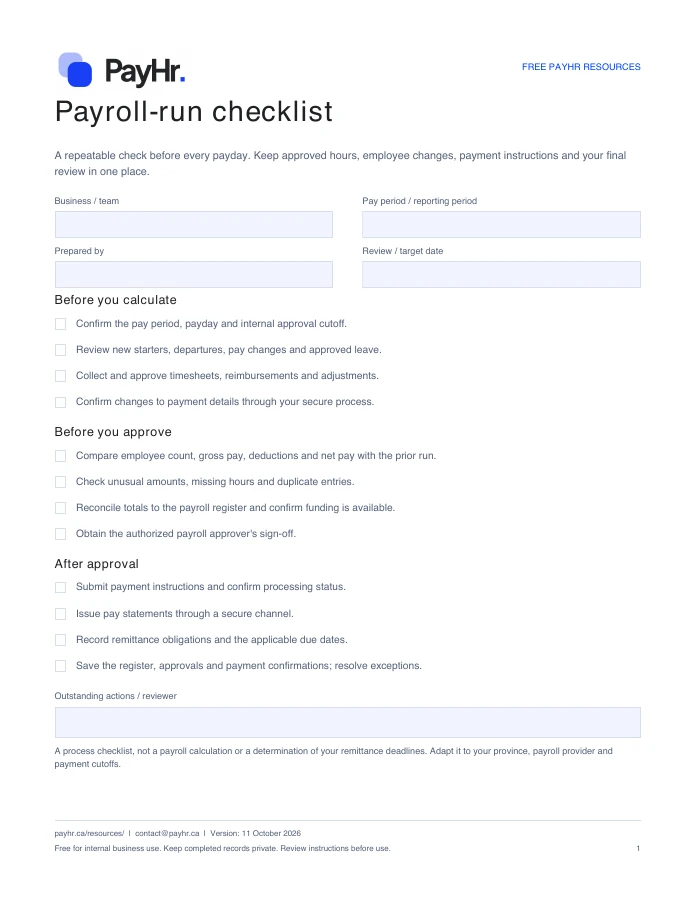
Payroll-run checklist.

A repeatable check before every payday. Keep approved hours, employee changes, payment instructions and your final review in one place.

PDFFree download
Preview of the first page of the PayHr payroll-run checklistPreview of the actual PDF

READY FOR YOUR NEXT PAYDAY

Make it yours.

Download a fresh copy, add your details and adapt it to the way your team works.

  • A before, during and after payroll checklist
  • Owner, pay-period and approval fields
  • A record of follow-up actions and payment confirmation

No account or email required. Free for internal business use.

FROM DOWNLOAD TO DONE

How to use this template

  1. Enter the business, pay period, payday and person preparing the run.
  2. Work through the checks using approved source records. Assign an owner to anything outstanding.
  3. Have the authorized approver review the totals and payment instructions before releasing payments.
  4. Record payment and remittance references, then save the checklist with the payroll records.

WHAT YOU CAN PREPARE

A clearer process, step by step.

Before you calculate

  • Confirm the pay period, payday and internal approval cutoff.
  • Review new starters, departures, pay changes and approved leave.
  • Collect and approve timesheets, reimbursements and adjustments.
  • Confirm changes to payment details through your secure process.

Before you approve

  • Compare employee count, gross pay, deductions and net pay with the prior run.
  • Check unusual amounts, missing hours and duplicate entries.
  • Reconcile totals to the payroll register and confirm funding is available.
  • Obtain the authorized payroll approver's sign-off.

After approval

  • Submit payment instructions and confirm processing status.
  • Issue pay statements through a secure channel.
  • Record remittance obligations and the applicable due dates.
  • Save the register, approvals and payment confirmations; resolve exceptions.

Before you download

Can I fill it in on my computer?

Yes. The PDF includes interactive checkboxes and text fields. Use a PDF reader that supports forms, then save your completed copy. You can also print it.

Does checking every box submit payroll?

No. The checklist organizes your review. Submit and confirm payments, remittances and any filings through your chosen services.

Do I need a PayHr account?

No. Every resource is available to download directly. Email updates are optional and separate from your download.

Will PayHr receive the information I enter?

No. These are files you download and complete yourself. PayHr does not receive the contents of your completed template. Keep employee and payroll records in your own secure storage.

YOUR NEXT PAYDAY, TOGETHER

A good template is a start.
PayHr brings it together.

Explore free payroll software for Canadian businesses, with unlimited employees, contractors and pay runs.

Create your free workspace See plan details