FREE RESOURCES / HIRING & ONBOARDING

Employee onboarding checklist.

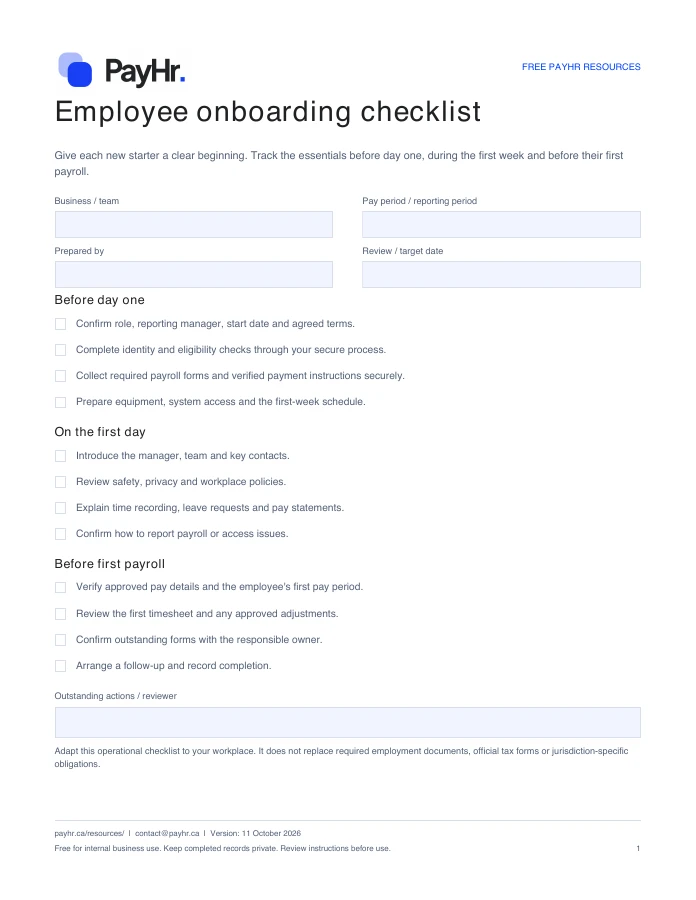
Give each new starter a clear beginning. Track the essentials before day one, during the first week and before their first payroll.

WordPDFFree download
Preview of the first page of the PayHr employee onboarding checklistPreview of the actual PDF

READY FOR YOUR NEXT PAYDAY

Make it yours.

Download a fresh copy, add your details and adapt it to the way your team works.

  • Pre-start, first-day and first-payroll checks
  • Editable Word version for your team's workflow
  • Fillable PDF with employee, owner and notes fields

No account or email required. Free for internal business use.

FROM DOWNLOAD TO DONE

How to use this template

  1. Add the employee, start date and onboarding owner.
  2. Adapt the task list to the role and assign outstanding items.
  3. Confirm access, payroll setup and required forms before the first pay cutoff.
  4. Save the completed checklist in your restricted employee records.

WHAT YOU CAN PREPARE

A clearer process, step by step.

Before day one

  • Confirm role, reporting manager, start date and agreed terms.
  • Complete identity and eligibility checks through your secure process.
  • Collect required payroll forms and verified payment instructions securely.
  • Prepare equipment, system access and the first-week schedule.

On the first day

  • Introduce the manager, team and key contacts.
  • Review safety, privacy and workplace policies.
  • Explain time recording, leave requests and pay statements.
  • Confirm how to report payroll or access issues.

Before first payroll

  • Verify approved pay details and the employee's first pay period.
  • Review the first timesheet and any approved adjustments.
  • Confirm outstanding forms with the responsible owner.
  • Arrange a follow-up and record completion.

Before you download

Can I change the checklist?

Yes. The Word version is fully editable. Add role-specific tasks, owners and target dates before sharing it with your team.

Where should I save completed copies?

Use your business's access-controlled employee records. Completed copies can contain personal information and should not be stored in a public shared folder.

Do I need a PayHr account?

No. Every resource is available to download directly. Email updates are optional and separate from your download.

Will PayHr receive the information I enter?

No. These are files you download and complete yourself. PayHr does not receive the contents of your completed template. Keep employee and payroll records in your own secure storage.

YOUR NEXT PAYDAY, TOGETHER

A good template is a start.
PayHr brings it together.

Explore free payroll software for Canadian businesses, with unlimited employees, contractors and pay runs.

Create your free workspace See plan details