Claim review
- Check the business purpose and receipt for each line.
- Confirm amounts use the stated reporting currency.
- Review reimbursement and tax treatment separately.
- Record approval and payment confirmation.
FREE RESOURCES / PAYROLL
Receipts in, clear totals out. Give employees a simple way to list expenses and reviewers a place to record the approved reimbursement.
 Excel
Excel PDFFree download
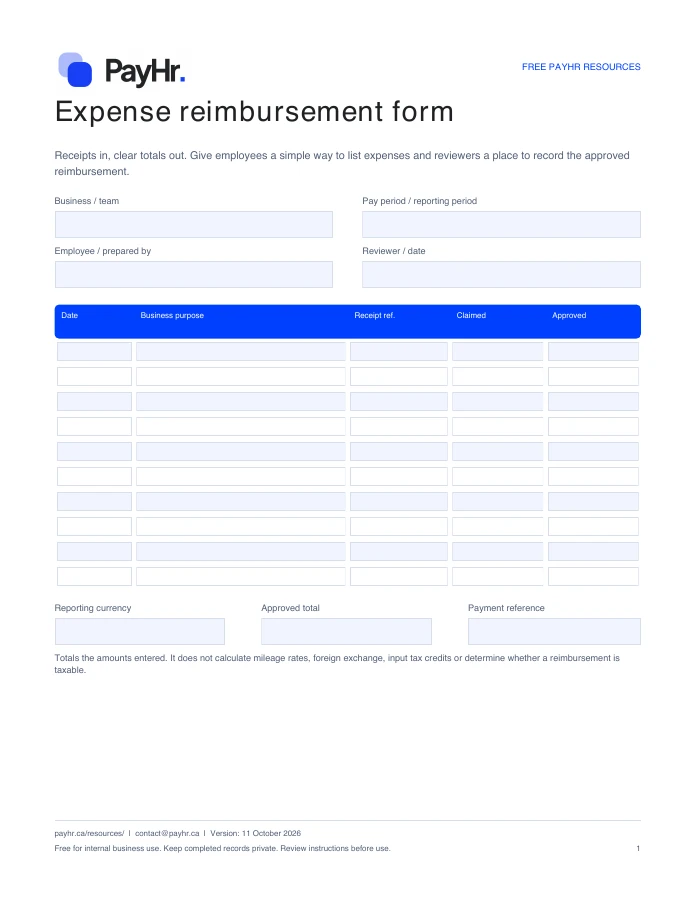 Preview of the actual PDF
READY FOR YOUR NEXT PAYDAY
Download a fresh copy, add your details and adapt it to the way your team works.
No account or email required. Free for internal business use.
FROM DOWNLOAD TO DONE
WHAT YOU CAN PREPARE
Convert and document them under your business's approved process first. Enter all lines in the one reporting currency shown on the form.
Enter the total amount claimed, including tax where applicable under your policy. Any tax recovery or payroll treatment needs a separate review.
No. Every resource is available to download directly. Email updates are optional and separate from your download.
No. These are files you download and complete yourself. PayHr does not receive the contents of your completed template. Keep employee and payroll records in your own secure storage.
OPTIONAL EMAIL UPDATES
Get PayHr product updates, new tools and practical payroll guides. Your tools and downloads are free without subscribing.

 PDF
PDFA repeatable check before every payday. Keep approved hours, employee changes, payment instructions and your final review in one place.
View resource ExcelPDF
Make differences visible before they become a mystery. Compare the payroll register with your accounting and payment records, then document the follow-up.
View resource
 WordPDF
Start with the everyday details. Keep contact and job information organized while sensitive identity and bank details stay in your secure collection process.
View resourceYOUR NEXT PAYDAY, TOGETHER
Explore free payroll software for Canadian businesses, with unlimited employees, contractors and pay runs.
Create your free workspace See plan details