TAXES & COMPLIANCE
Track payroll taxes and CRA remittances
Every pay run creates source deductions you hold in trust for the Canada Revenue Agency (CRA): income tax, CPP, CPP2 and EI, plus the employer's CPP, CPP2 and EI. This guide explains how PayHr groups them into remittance periods, works out due dates from your remitter type, and keeps a record of what you have paid. It is for owners and admins who remit to CRA.

 NARRATED TUTORIALWatch: Track CRA remittancesSee every step below in the actual PayHr screens, with captions.
Before you start
- Your 15-character CRA payroll account number (for example 123456789RP0001) saved in Business details
- Your remitter type from CRA (it appears on your remittance voucher or CRA notices)
- At least one approved pay run
- Access to your business online banking, or another CRA payment method
01Open the Taxes page
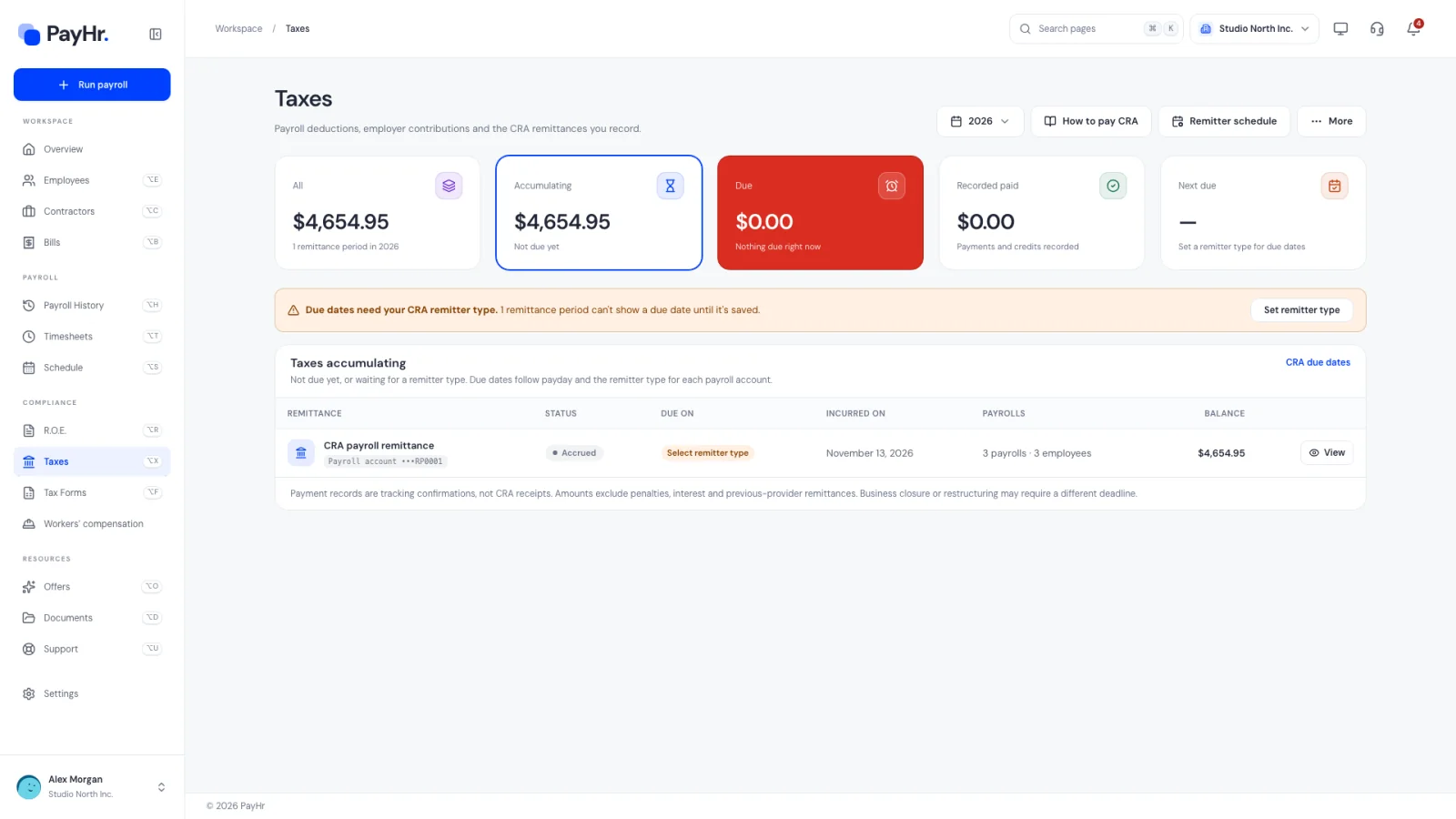
Select Taxes in the sidebar. The page shows payroll deductions, employer contributions and the CRA remittances you record for the year chosen at the top right. Only approved pay runs count; drafts and contractor bills are not included.
The cards across the top filter the list below:
- All: everything accrued for the year, across every remittance period.
- Accumulating: owed but not due yet (or waiting for a remitter type).
- Due (in red): due today or earlier and not fully paid. This is what needs your attention.
- Recorded paid: payments and CRA credits you have recorded.
- Next due: the date and amount of your next deadline, with a button straight to that period.
If you see Due dates need your CRA remitter type, PayHr can't show due dates yet; set it in the next step.
02Set your CRA remitter type
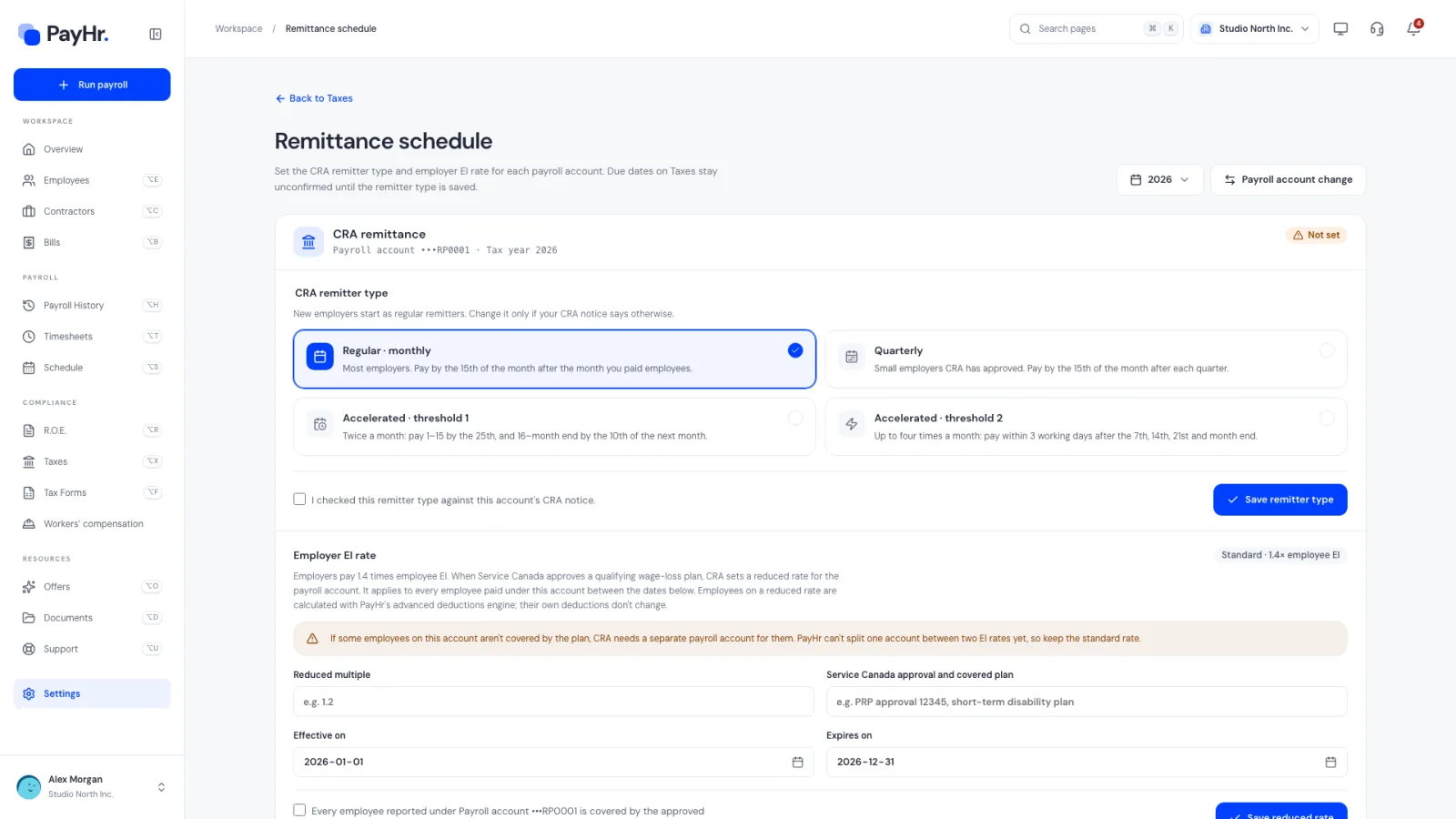
Select Remitter schedule. CRA assigns every payroll account a remitter type based on your average monthly withholding, and it decides your deadlines:
- Regular · monthly: most employers. Pay by the 15th of the month after the month you paid employees.
- Quarterly: small employers CRA has approved. Pay by the 15th of the month after each quarter.
- Accelerated · threshold 1: twice a month. Pay for paydays on the 1st to 15th by the 25th, and the 16th to month end by the 10th of the next month.
- Accelerated · threshold 2: up to four times a month, within three working days after the 7th, 14th, 21st and the last day of the month.
New employers start as regular remitters, and each new year carries forward last year's type. Choose the type on your CRA notice, tick I checked this remitter type against this account's CRA notice and select Save remitter type. If CRA later changes your type, pick the new one, enter the Effective on date (a future remittance period) and the CRA notice reference, and select Record schedule change. Amounts already accrued keep their original schedule.
03Check the employer EI rate
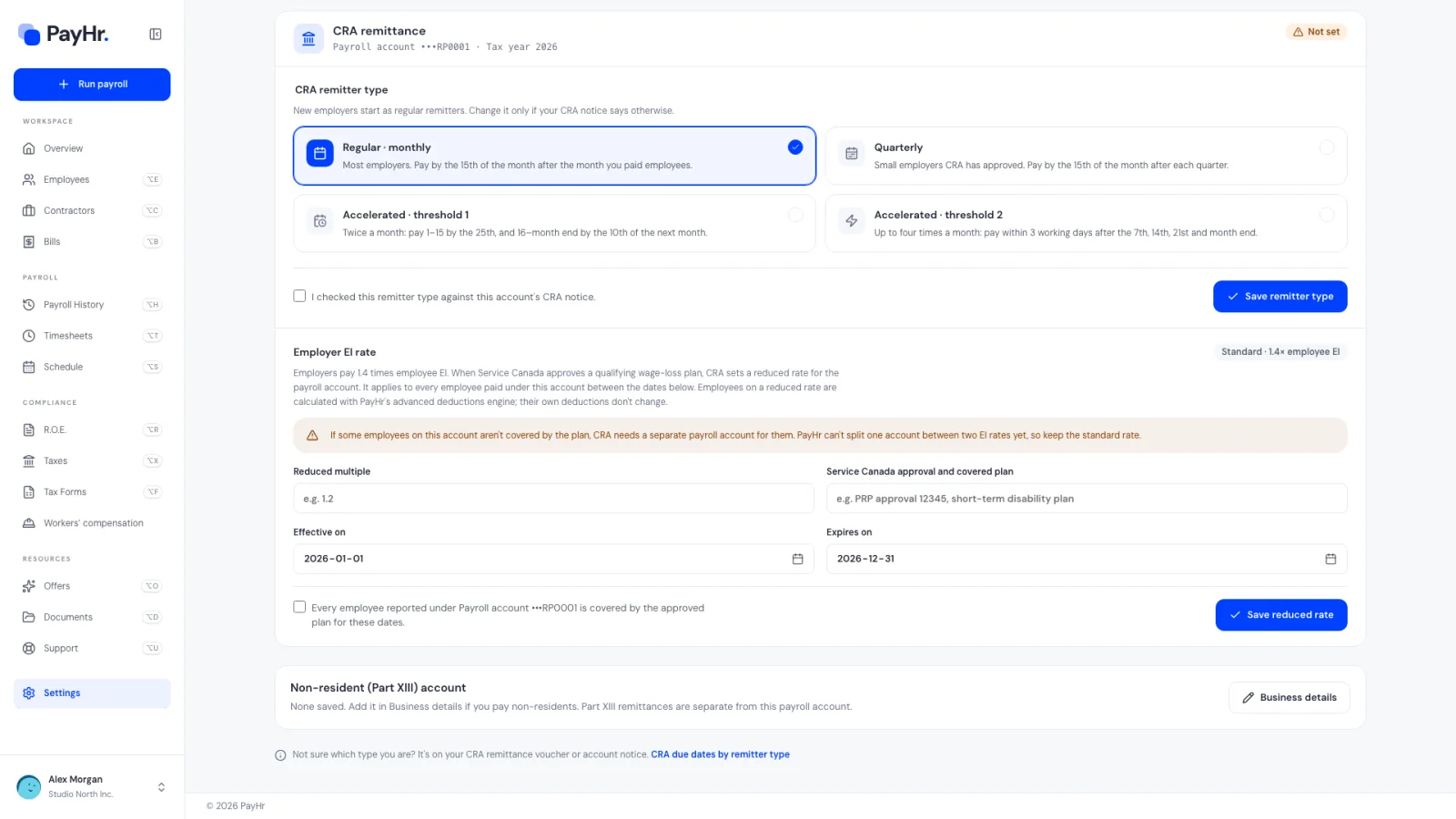
On the same page, Employer EI rate shows Standard · 1.4× employee EI. Employers normally pay 1.4 times the EI deducted from employees.
If Service Canada has approved a qualifying wage-loss plan (such as short-term disability coverage), CRA may set a reduced employer rate for that payroll account. Only then enter the reduced multiple, the approval details and the dates it applies. It covers every employee paid under that account, so if some employees aren't covered by the plan, CRA needs them on a separate payroll account. Open draft pay runs in that window recalculate with the new rate; review them before approving.
04See what each pay run owes
When you review a pay run, its breakdown shows CRA remittance for that payroll only and the CRA remittance due date under your remitter type. A pay run's figures may not cover the whole remittance period: everything paid in the same period is remitted together, which is why the Taxes page groups pay runs into periods.
Remittances follow the payday, not the work dates. A pay period that ends on December 31 but is paid on January 5 belongs to January's remittance. December's remittance for regular remitters is due January 15.
05Open a remittance period
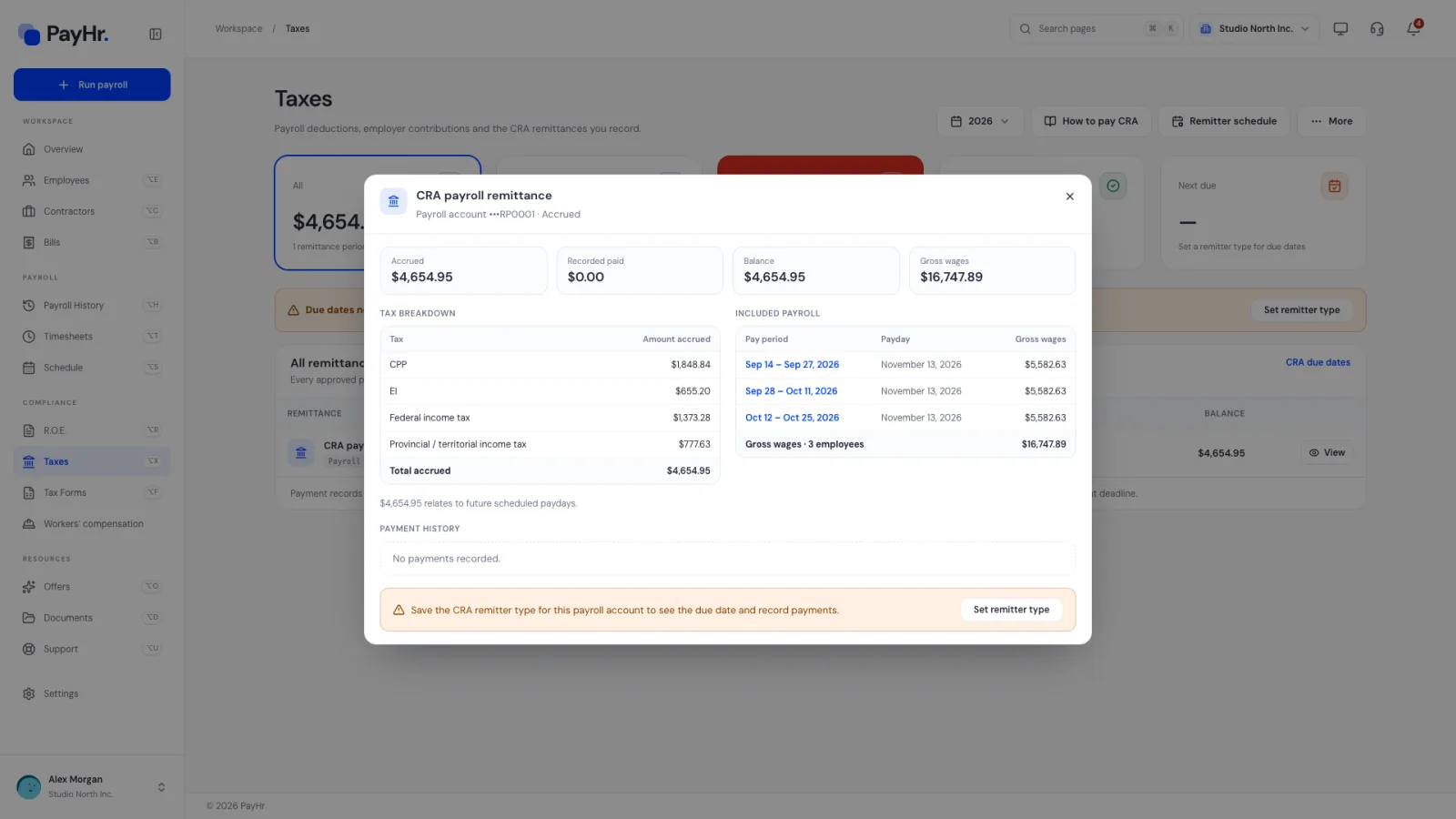
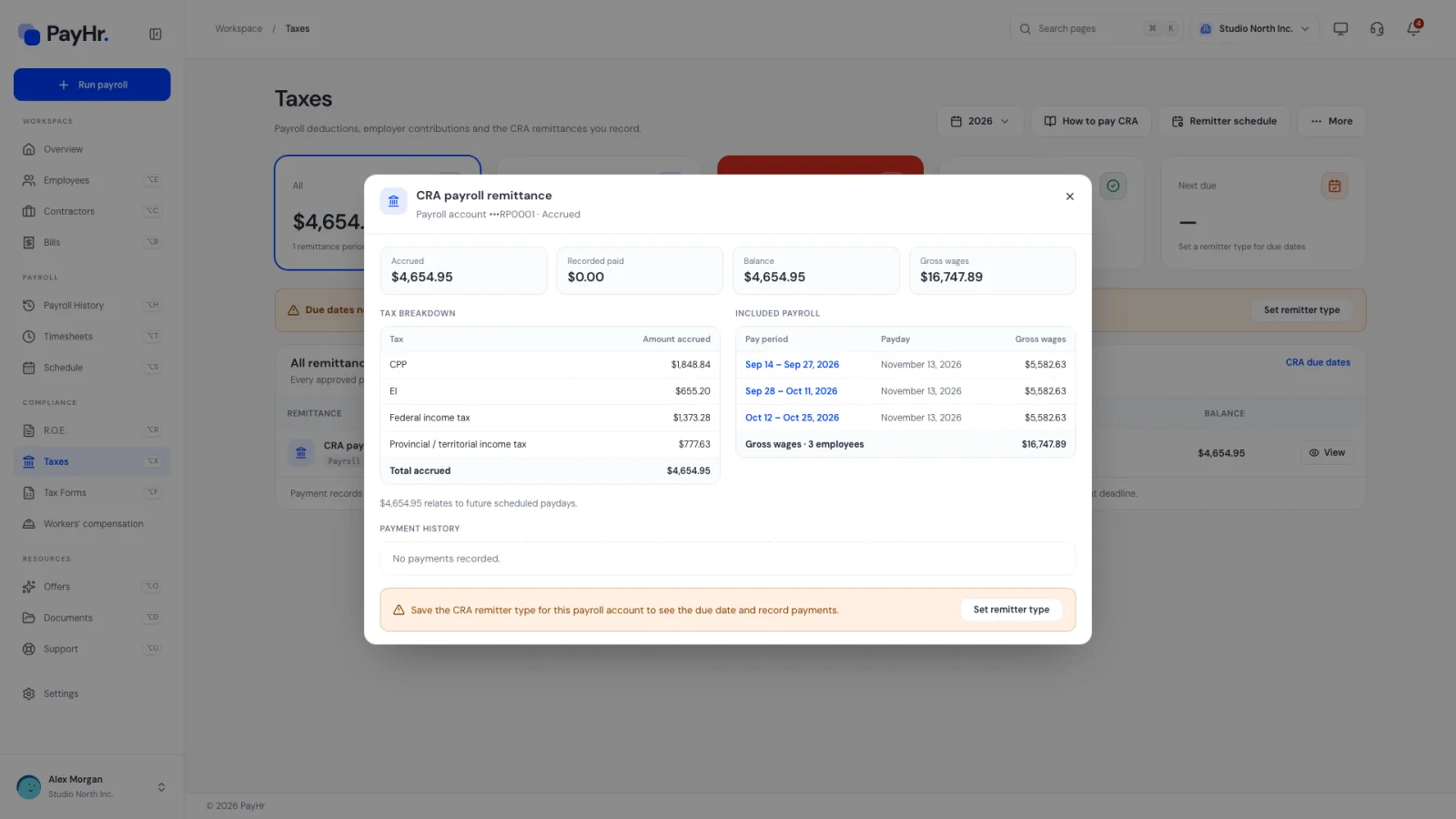
Each row in the list is one CRA payroll remittance for one payroll account and period. It shows the remitter type, the status (Unpaid, Partially paid, Due today, Overdue, Paid or Credit), the due date, the payrolls included and the balance.
Select View or Record payment to open it:
- The totals: Accrued, Recorded paid, Balance and Gross wages.
- Tax breakdown: federal income tax, provincial income tax, CPP, CPP2 and EI, each including the employer's share where there is one.
- Included payroll: every pay run in the period, with gross wages and the number of employees paid.
- Payment history: payments and adjustments recorded so far.
Your bank or CRA will ask for the period's gross payroll and the number of employees paid on the last payday. Take them from here, not from a single pay run.
06Pay CRA
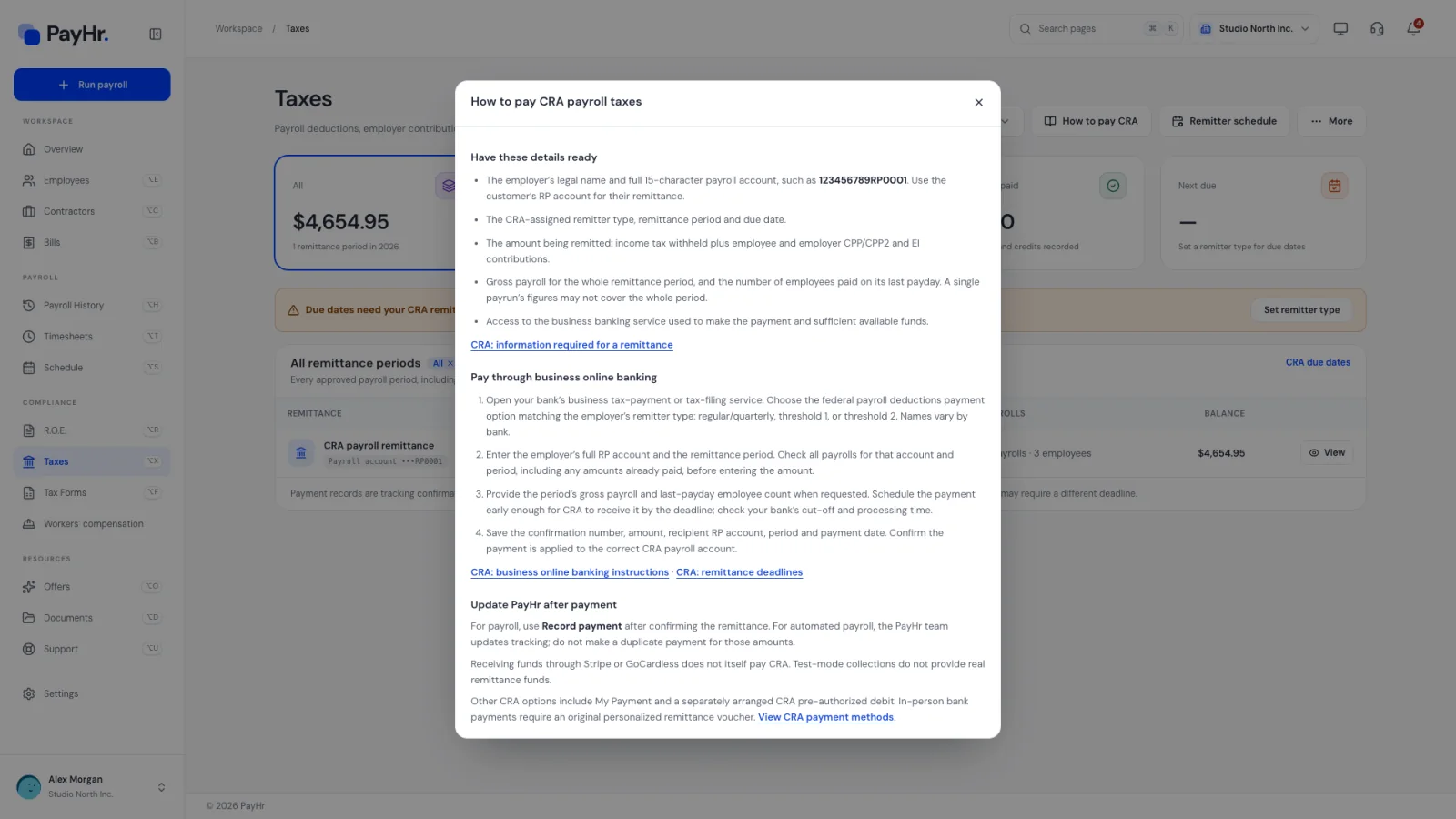
PayHr doesn't send money to CRA for you when you pay employees manually. Select How to pay CRA for a step-by-step guide. In short:
- Have ready your legal name, the full 15-character payroll account, the remittance period, the amount (income tax plus employee and employer CPP, CPP2 and EI), the period's gross payroll and the employee count.
- In your bank's business tax payment service, choose the federal payroll deductions option that matches your remitter type (regular/quarterly, threshold 1 or threshold 2). Names vary by bank.
- Enter your RP account and the period, then the amount. Schedule it early enough for CRA to receive it by the due date; check your bank's cut-off times.
- Save the confirmation number.
CRA also accepts My Payment and pre-authorized debit. CRA can charge penalties and interest on late or short remittances. If your workspace uses Automated Pay, a paid option whose availability is shown in your workspace, the PayHr team remits and tracks the taxes from those payrolls; don't pay those amounts yourself as well.
07Record the payment in PayHr
After CRA has received the money, open the period and use Record payment:
- Amount paid ($): prefilled with the open balance; change it for a partial payment.
- Date received by CRA: the date CRA received it, which decides whether it was on time.
- Payment reference: your bank confirmation number.
Tick I confirmed this payment in the account's payment records and select Record payment. The period's balance drops and its status updates. A record in PayHr is your tracking, not a CRA receipt, and it never moves money. Amounts in PayHr exclude penalties, interest and anything remitted by a previous payroll provider.
08Record CRA adjustments and related pages
If your CRA statement of account shows an overpayment, a refund or a transfer, use Record CRA adjustment in the period: choose CRA credit / excess remittance, Refund received from CRA or Credit transferred to another period, with the date and reference from the statement.
The More menu links to All remittance periods, Garnishments, Retiring allowances and Part XIII, and Payroll account transfers, where you record a move between two RP accounts of the same legal employer (annual CPP and EI maximums carry across).
Employees in the Northwest Territories or Nunavut have territorial payroll tax withheld; PayHr shows that total separately because it is remitted to the territory, not CRA.
Questions people ask
What is a remitter type and where do I find mine?
It is how often CRA expects you to send source deductions, based on your average monthly withholding from two years earlier. New employers are usually regular (monthly) remitters. CRA tells you if it changes; it appears on your remittance vouchers and CRA notices.
Does PayHr pay CRA for me?
Not for payroll you pay manually: you pay CRA through your bank and record it in PayHr. With Automated Pay (a paid option, availability shown in your workspace), the PayHr team handles the remittance for those payrolls.
Why is a period Overdue when I paid it?
PayHr only knows about payments you record. Open the period, choose Record payment and enter the amount, the date CRA received it and your reference.
What makes up the amount I remit?
Federal and provincial income tax withheld, the employee's CPP, CPP2 and EI, plus the employer's matching CPP and CPP2 and the employer EI (normally 1.4 times the employee amount). The Tax breakdown in each period shows each line.
I switched to PayHr part way through the year. Are earlier remittances included?
No. The Taxes page covers payroll approved in PayHr. Remittances owed or paid through your previous provider aren't imported, so track those separately.