TAXES & COMPLIANCE
Track workers' compensation premiums (WSIB, WCB) and employer health tax
Workers' compensation premiums are an employer cost paid to your provincial board, such as WSIB in Ontario or WorkSafeBC. Some provinces also charge an employer health tax. This guide shows how to set up each account in PayHr so it can work out what you owe from approved payroll, by reporting period, and keep a record of what you have paid. It is for owners and admins.
 NARRATED TUTORIALWatch: Track workers’ compensationSee every step below in the actual PayHr screens, with captions.
Before you start
- Your board account number (for example your WSIB account or firm number)
- This year's premium rate per $100 of insurable earnings, from your board's rate notice
- How often the board expects you to report and pay (monthly, quarterly or annual)
- Each employee's work province saved in their employee details
- If you joined PayHr part way through the year: what the board already charged and what you already paid, from its statement
01Open Workers' compensation
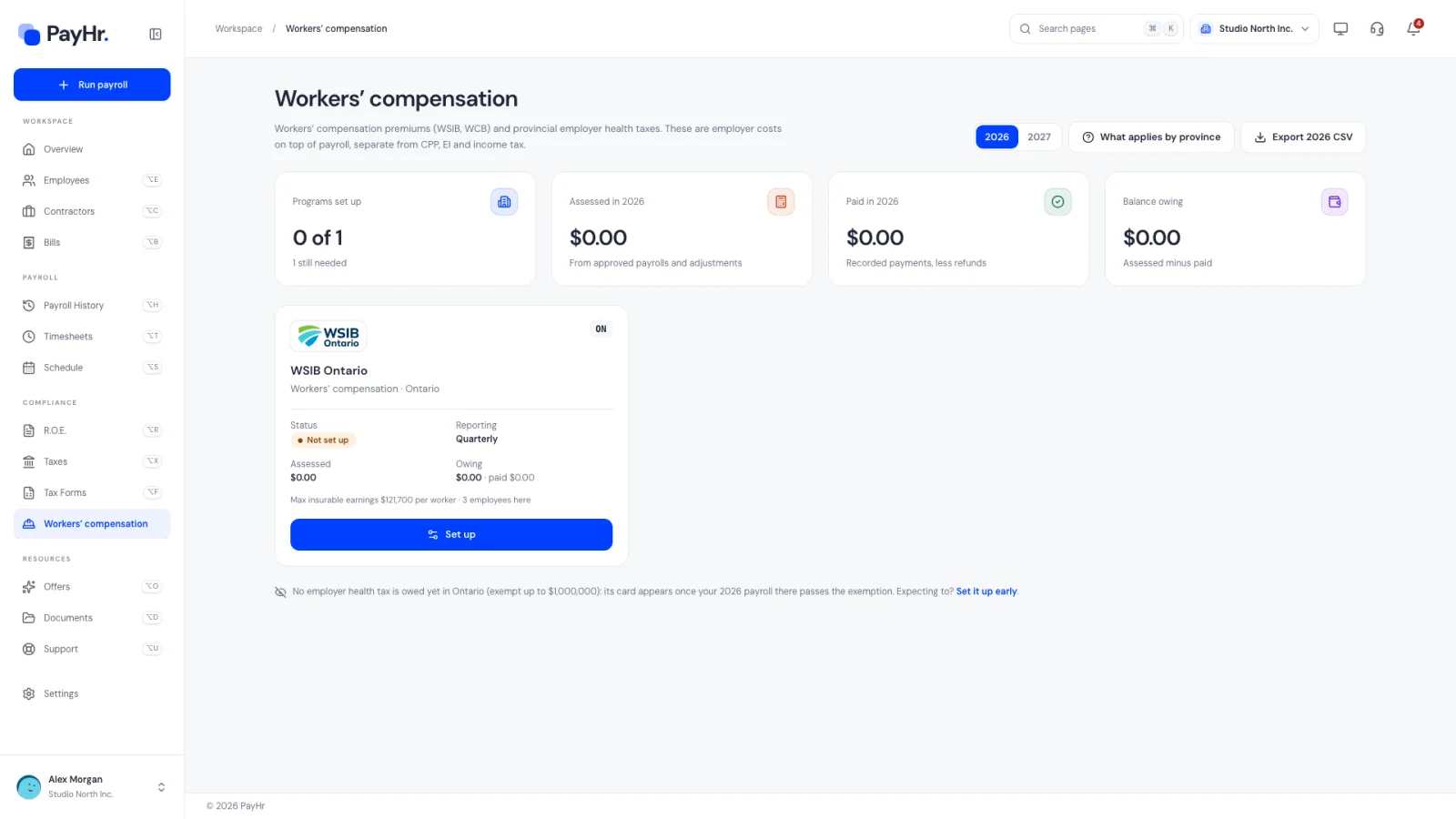
Select Workers' compensation in the sidebar. This page covers workers' compensation premiums (WSIB, WCB) and provincial employer health taxes. Both are employer costs on top of payroll: they are never deducted from employees' pay and are separate from the CPP, EI and income tax you remit to CRA.
The summary cards show Programs set up (and how many are still needed), Assessed for the year (from approved payrolls and adjustments), Paid (recorded payments less refunds) and the Balance owing (or a credit with the agencies).
Below them, PayHr shows a card for each province where your employees work, with the board's logo, its Status (Not set up, Active, Not applicable, Expired or Starts soon), the reporting frequency, what's assessed and owing, and the board's maximum insurable earnings per worker. Use the year switch at the top to see another year; next year is available so you can set it up in advance.
02Check what applies in each province
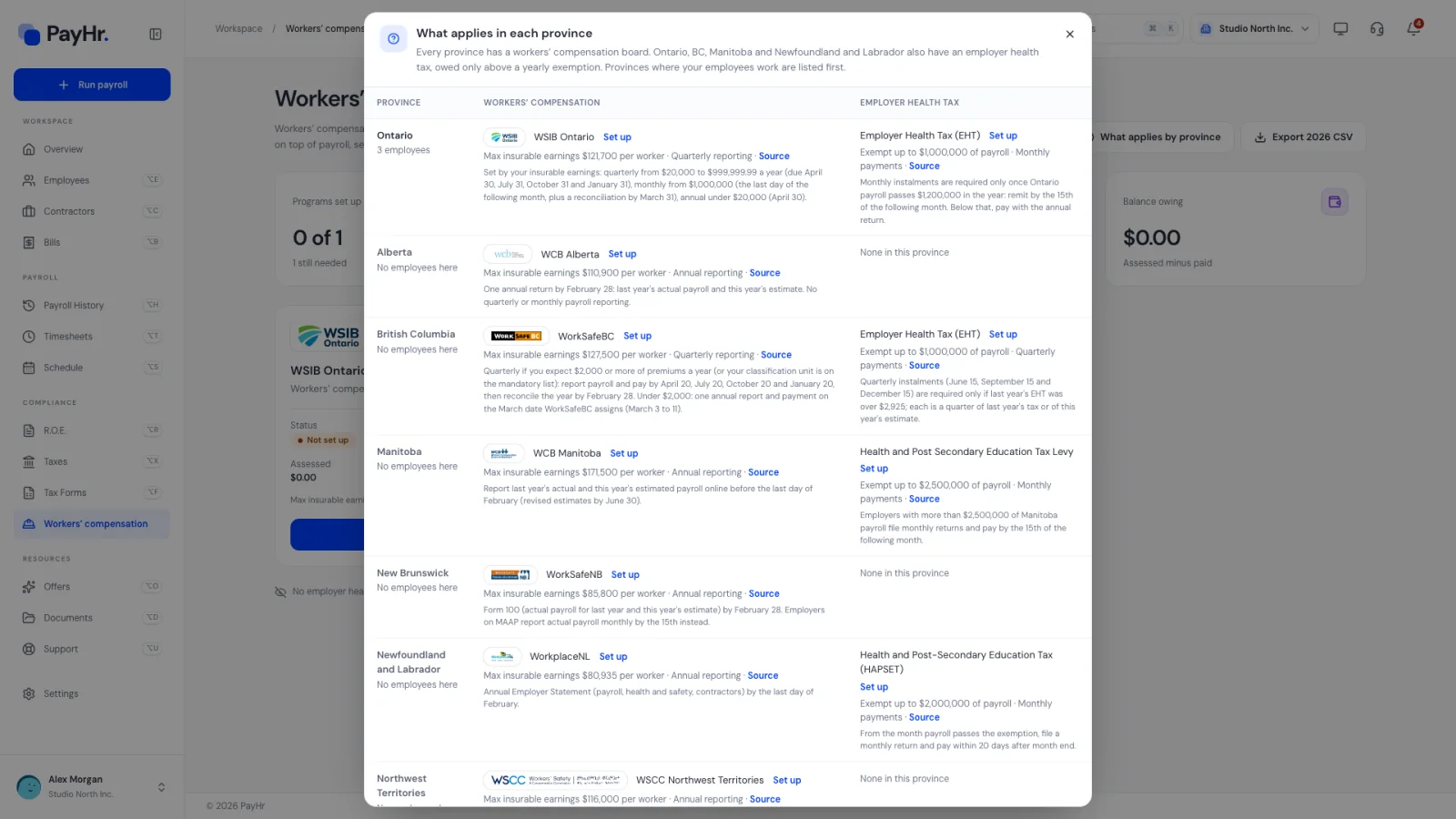
Select What applies by province. Every province has a workers' compensation board, and most employers must register with it once they hire. Ontario, British Columbia, Manitoba, and Newfoundland and Labrador also have an employer health tax, owed only when your payroll in that province passes a yearly exemption (in Ontario, the Employer Health Tax exemption is $1 million for most private employers). Provinces where your employees work are listed first.
An employer health tax card appears on the main page automatically once your year's payroll in that province passes the exemption. If you expect to pass it, or the account already exists, you can set it up early from this popup.
Some industries and roles are exempt from mandatory coverage in some provinces. If your board has confirmed you don't need coverage, you can still save the account as not applicable (see the next step) so the card stops asking.
03Set up your board account
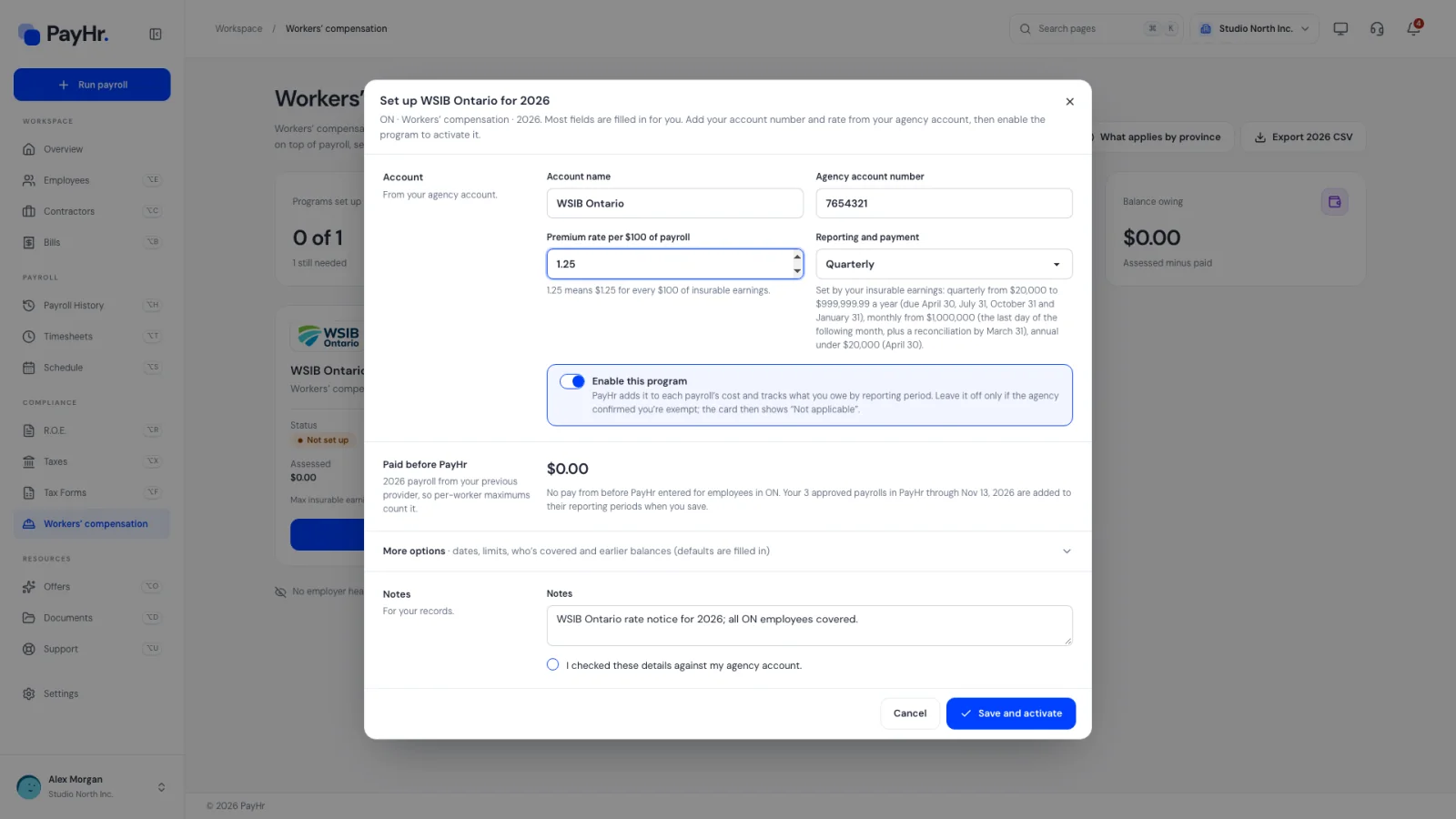
On the province's card, select Set up. Most fields are filled in for you; the essentials are:
- Account name and Agency account number: as shown in your board account.
- Premium rate per $100 of payroll: from this year's rate notice. A rate of 1.25 means $1.25 for every $100 of insurable earnings. Rates depend on your industry classification and change each year.
- Reporting and payment: how often you report and pay. In Ontario, WSIB sets it by your insurable earnings: quarterly from $20,000 to $999,999.99 a year (due April 30, July 31, October 31 and January 31), monthly from $1 million, and annual under $20,000 (due April 30).
- Enable this program: keep it on so PayHr adds the premium to each payroll's cost and tracks what you owe. Turn it off only if the board confirmed you're exempt; the card then shows Not applicable and nothing is owed.
Paid before PayHr shows this year's earnings from each employee's Payroll before PayHr, so the per-worker maximum counts them. More options holds the dates (the whole year by default), the Maximum insurable earnings per worker (the province's figure, $121,700 for Ontario in 2026), Who's covered (everyone whose work province matches, or only selected employees) and Agency balances before PayHr. Add a note, tick I checked these details against my agency account and select Save and activate.
04Review premiums by reporting period
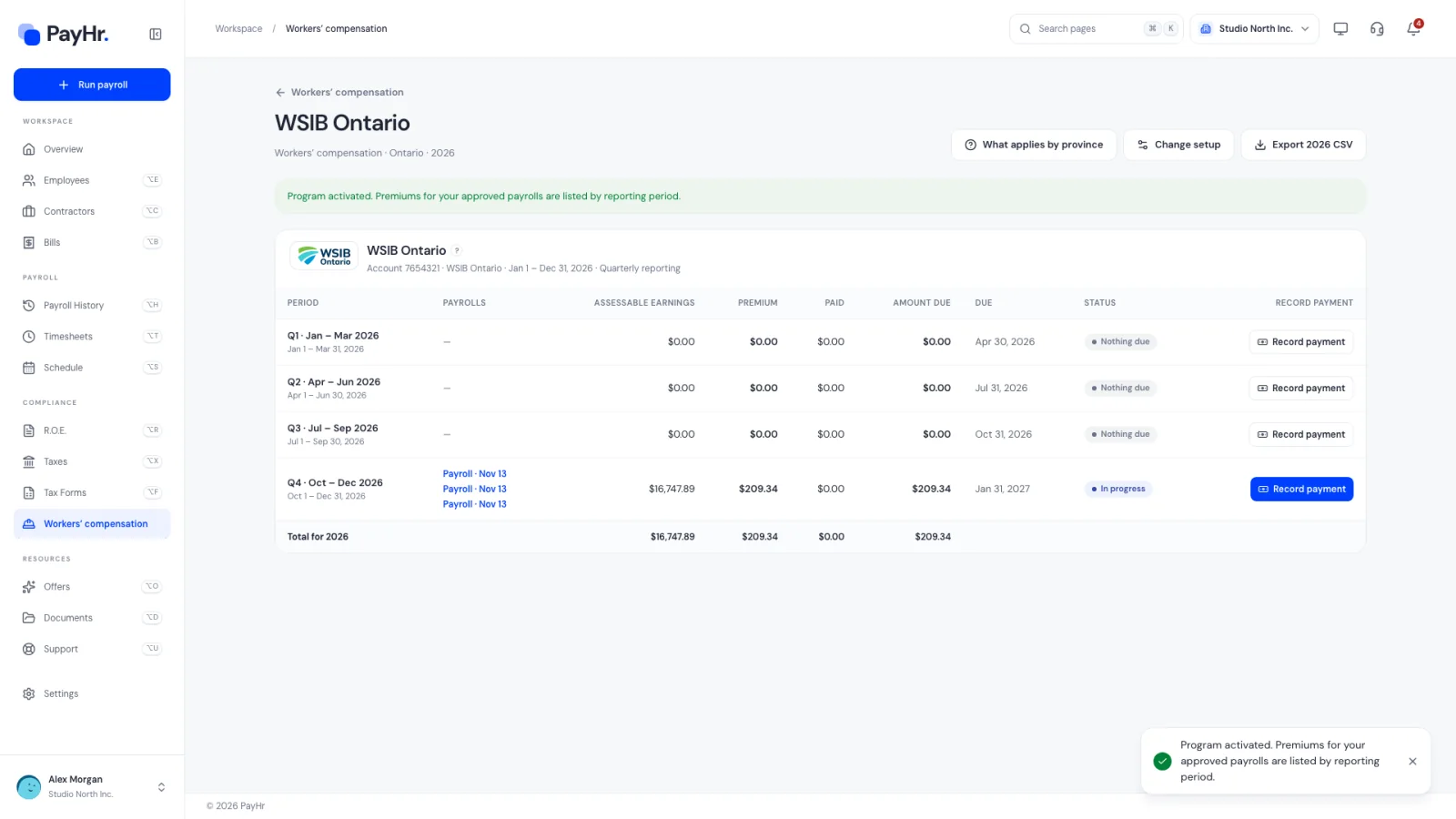
After saving, the account's own page opens (you can return to it any time with Manage on the card). It lists each reporting period for the year with:
- Payrolls: the approved pay runs in that period (by payday), plus any earnings before PayHr or opening agency balance.
- Assessable earnings: insurable earnings for covered employees, each capped at the yearly maximum per worker. Once someone reaches the maximum, no more premium is charged on their pay for the year.
- Premium (or Levy for a health tax), Paid, Amount due, the Due date and a Status.
New pay runs are added to their period automatically when you approve them. The row Total for the year sums everything, and the small ? beside the account name repeats the board's reporting and payment rules. If your rate or setup changes, use Change setup.
05Report and pay the board, then record the payment
PayHr doesn't report to or pay your board. Each period, report your insurable earnings and pay through the board's own online services (for WSIB, its online services or your bank), using the figures from the period's row. In Ontario, premiums are paid with each report, and WSIB expects to hear within 10 days if your actual earnings will exceed your estimate.
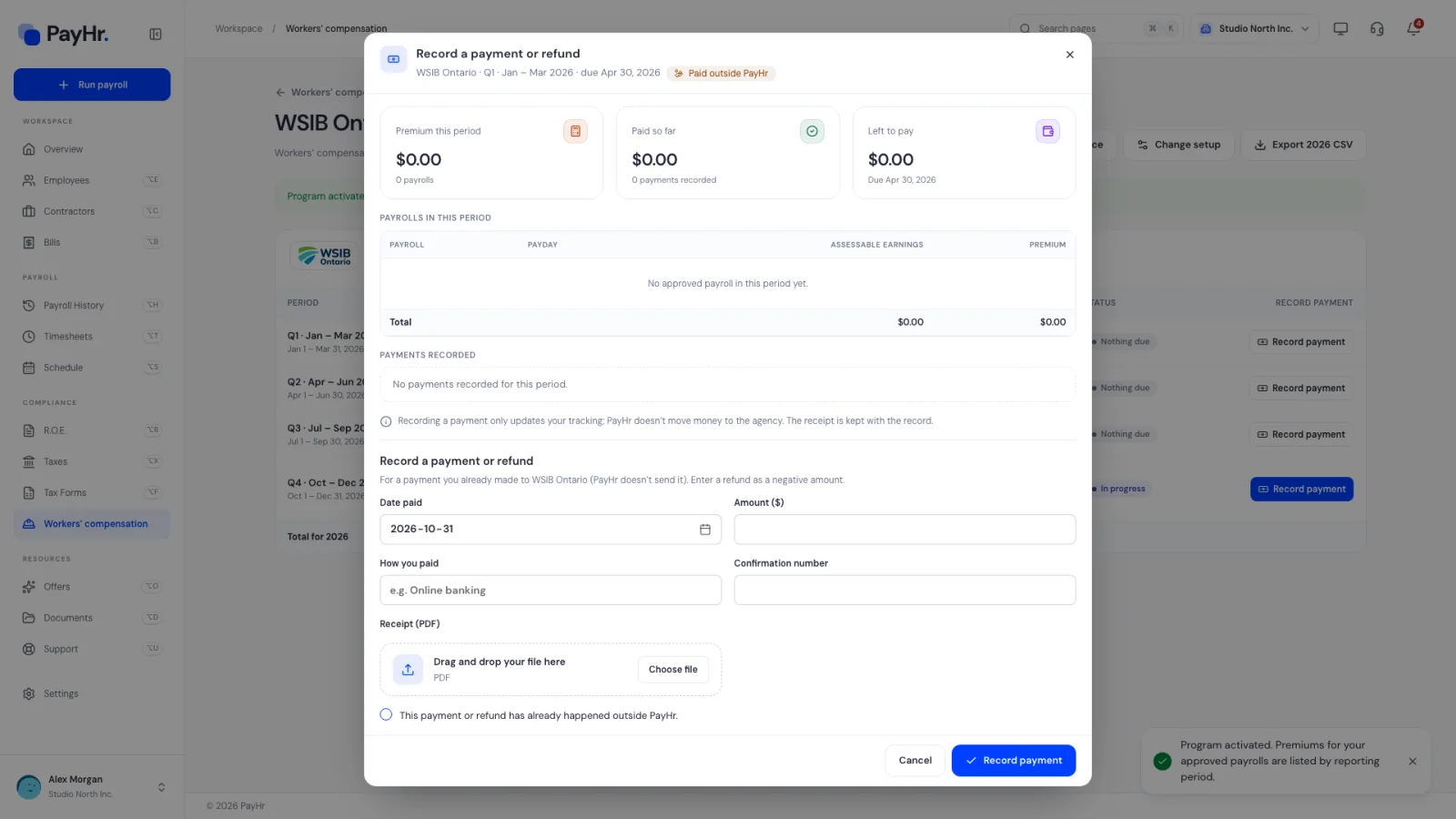
Then select Record payment on that period. The popup lists the payrolls behind the period and any payments already recorded. Enter:
- Date paid and Amount ($): enter a refund from the board as a negative amount.
- How you paid (for example online banking) and the Confirmation number.
- Receipt (PDF): the board's receipt or confirmation, kept with the record.
Tick This payment or refund has already happened outside PayHr and select Record payment. The period's amount due and the page totals update. Recording only updates your tracking; PayHr doesn't move money to the agency.
06Export, renew and reconcile at year end
Export downloads the year's assessments as a CSV for your accountant or the board's annual reconciliation. Many boards ask for an annual statement of actual insurable earnings early in the new year, so compare your board's figures with this export.
Rates and maximums change every year, so accounts are renewed rather than copied. When you open the new year, PayHr lists last year's accounts that aren't set up yet with Renew: it keeps the account details and who's covered, and you enter the new year's rate and maximum from the board's notice. The year-end checklist on Overview also reminds you to pay the year's WCB and EHT assessments and file the annual returns by their deadlines.
Questions people ask
Do I have to register with WSIB or my provincial WCB?
Most employers with employees must register with the board in each province where people work, usually within days of hiring. A few industries and roles are exempt in some provinces. Check with your board, then set the account up in PayHr, or mark it not applicable if the board says you're exempt.
Does PayHr pay or report to WSIB for me?
No. PayHr works out the premium and tracks what you owe and pay. You report and pay through the board's own services, then use Record payment so PayHr shows the period as paid.
How is the premium calculated?
Assessable (insurable) earnings for each covered worker in the period, capped at the board's yearly maximum per worker, multiplied by your rate per $100. For example, $10,000 of insurable earnings at a rate of 1.25 is a $125 premium.
What is employer health tax?
A provincial payroll tax in Ontario, British Columbia, Manitoba, and Newfoundland and Labrador, paid by employers on total remuneration above a yearly exemption. It is not deducted from employees. PayHr tracks it on the same page once you pass the exemption or set it up.
My rate changed part way through the year. What do I do?
Open the account with Manage and select Change setup to update it, using the details from your board's notice. Check the reporting periods afterwards and record any adjustment the board makes.